For Paint Stores & Retail Businesses

The POS system built for stores that build things.

Point of sale. Inventory. Customers. Accounting. One system, no compromises.

No credit card required. Setup in under 5 minutes.
syncerp.cloud
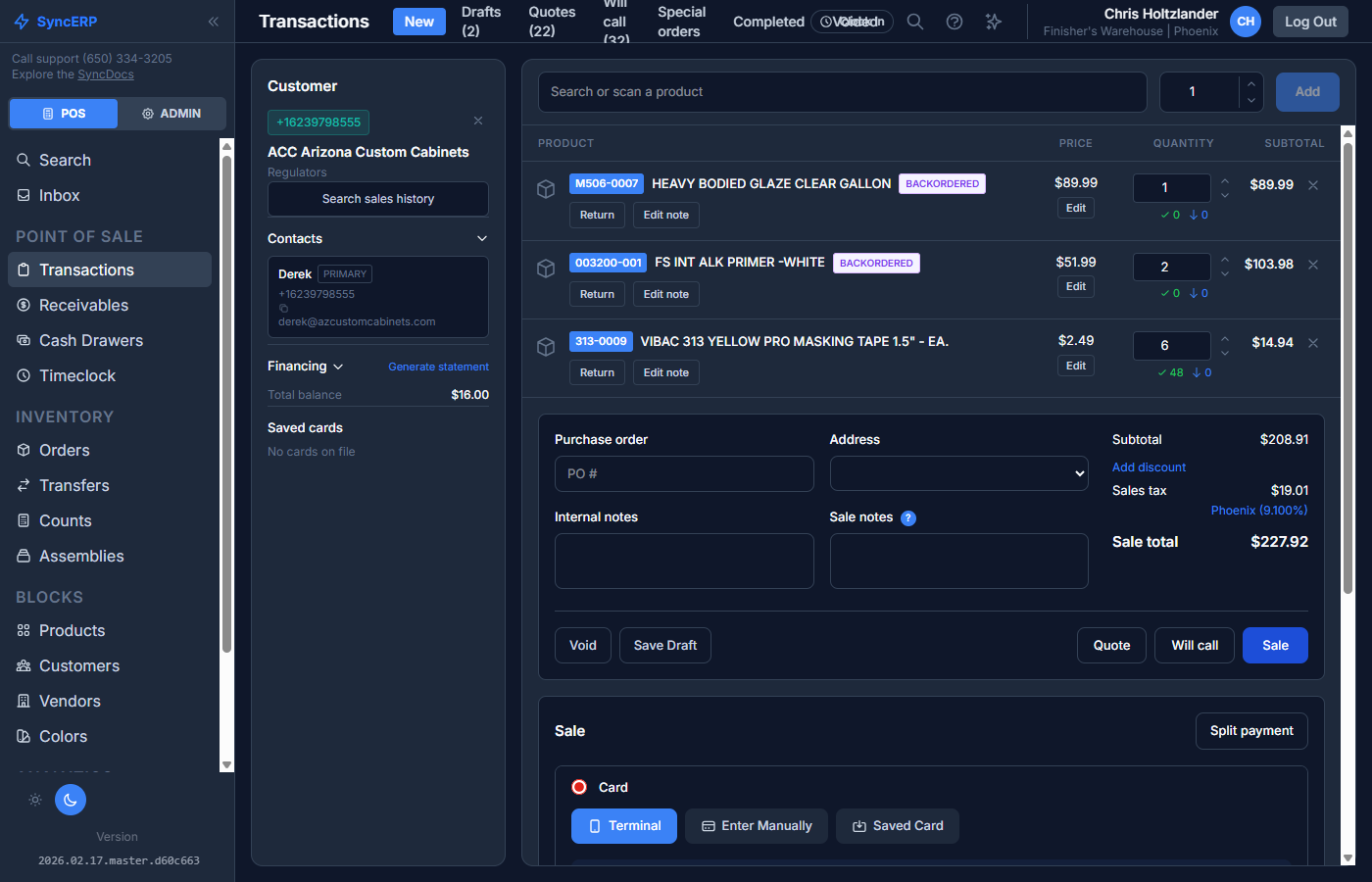
SyncERP POS Interface
0
Transactions Processed
0
Products Managed
0
Active Customers
99.8%
System Uptime

Everything your store needs. Nothing it doesn't.

Six integrated modules that work together so you don't have to piece things together yourself.

Ring up sales in seconds with an interface designed for speed. Support for barcode scanners, split payments, customer accounts, quotes, will calls, and special orders.

USB barcode scanner support
Cash, card, check & account payments
Quotes, will calls & special orders
Thermal receipt printing
Paint tint color matching
Tax-exempt customer handling
Split payments & partial refunds
Draft & saved transactions

Track every product across every location. Manage purchase orders, transfers, pricing tiers, and units of measure without spreadsheets.

Multi-location stock tracking
Purchase order management
Inter-location transfers
Units of measure & conversions
Custom pricing tiers
Bulk import from CSV/Excel
Vendor management
Inventory count & adjustments

Full customer profiles with transaction history, aging balances, receivables, and account management. Know your customers better than they know themselves.

Customer account balances
Aging balance reports
Transaction history
Receivables management
Custom pricing per customer
Tax exemption certificates
Statement generation
Bulk import & export

PIN-based authentication, role-based permissions, time clock with break tracking, and payroll reporting. Manage your team without a separate HR system.

PIN-based login (no passwords)
Role-based permissions
Time clock & break tracking
Payroll reports
Multi-location access control
Cash drawer tracking
Sales by employee reports
Auto sign-out after sale

Real-time dashboards, daily summaries, and financial reports. See what's selling, what's not, and where your money is going.

Daily sales summary
Payment method breakdown
Tax collection reports
Profit margin analysis
Inventory valuation
Accounts receivable aging
Custom report builder
Export to CSV/PDF

Connect to the tools you already use. Stripe for payments, QuickBooks and Zoho for accounting, and a mobile app for on-the-go access.

Stripe card & terminal payments
QuickBooks Online sync
Zoho Books sync
Xero accounting
Mobile app (iOS & Android)
REST API access
CSV/Excel data import
Stripe Connect for platforms

Up and running in three steps.

No consultants, no week-long onboarding. Just sign up and start selling.

1

Sign Up

Create your account at syncerp.cloud. Pick your company name and you're in.

2

Import Your Data

Upload products, customers, and inventory from CSV or Excel. Or start fresh.

3

Start Selling

Ring up sales, track inventory, manage customers, and run reports from day one.

Transparent pricing. No per-transaction fees.

One plan with everything included. No nickel-and-diming.

SyncERP Pro
Custom
Tailored to your business size and needs
  • Unlimited transactions
  • Unlimited products & customers
  • Multi-location support
  • Unlimited users & employees
  • All integrations included
  • Mobile app access
  • No per-transaction fees
  • Free data migration assistance
Get a Quote

Common questions

Are there per-transaction fees?

No. You pay a flat monthly rate regardless of how many transactions you process. Stripe's standard card processing fees still apply for card payments.

Is there a setup fee?

No setup fee. We'll help you migrate your data for free and get you running the same day.

Are there long-term contracts?

No. Month-to-month billing. Cancel anytime with no penalty.

What about hardware?

SyncERP works on any device with a browser. Use your existing computers, tablets, barcode scanners, and receipt printers.

Built for stores that build things.

Purpose-built features for the trades that keep America running.

Paint Stores

  • Tint color matching & formulas
  • Contractor account pricing
  • Will call & special orders

Building Materials

  • Units of measure conversions
  • Purchase order management
  • Multi-location transfers

Hardware Stores

  • Barcode scanner support
  • Thousands of SKUs
  • Fast product search

Lumber Yards

  • Board foot calculations
  • Quote-to-order workflow
  • Delivery management

Frequently asked questions.

SyncERP is built primarily for paint stores, building materials suppliers, hardware stores, and lumber yards. However, it works well for any retail business that needs inventory management, customer accounts, and point of sale capabilities.
Yes. SyncERP works with any USB HID barcode scanner out of the box. Just plug in your scanner and start scanning products at the register. If a scanned barcode isn't in the system, you can add the product on the spot.
SyncERP is cloud-based and requires an internet connection. Our mobile app does support offline mode for basic operations and will sync when connectivity is restored.
SyncERP supports bulk import from CSV and Excel files for products, customers, vendors, and inventory. We also offer free data migration assistance to help you switch from your current system with zero downtime.
SyncERP integrates with QuickBooks Online, Zoho Books, and Xero. Sales, payments, and customer data sync automatically to keep your books up to date without manual data entry.
Yes. Manage multiple locations from a single account with per-location inventory tracking, inter-location transfers, and location-specific reporting. Each employee can be assigned to one or more locations.
SyncERP uses industry-standard encryption, role-based access controls, and PIN-based authentication. Card payments are processed through Stripe and never touch our servers. Your data is backed up daily.
SyncERP supports cash, credit/debit cards (via Stripe), checks, customer account charges, and split payments. You can combine multiple payment methods on a single transaction.

Ready to modernize your store?

Join businesses that have already made the switch to SyncERP.